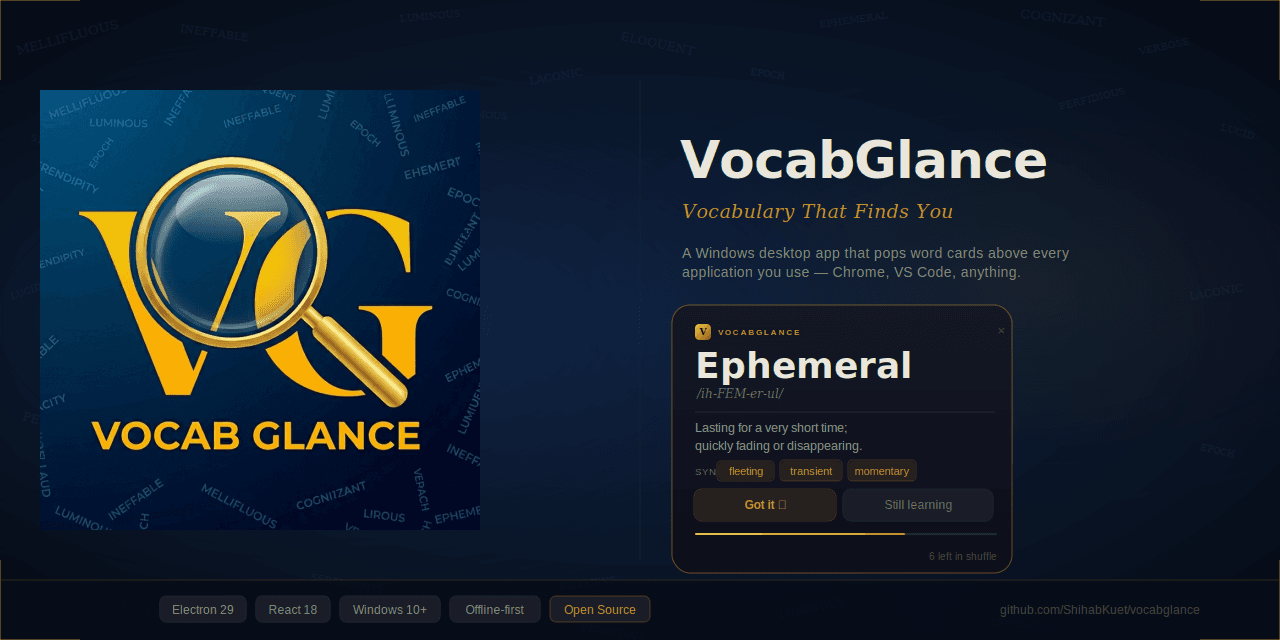
The Problem
Most vocabulary learning tools require deliberate, scheduled engagement. You open Anki, you open Duolingo, you sit down to study. This works for people with dedicated study time, but it breaks down for working developers whose available attention is already fully allocated.
The insight behind VocabGlance is that vocabulary retention does not require active study — it requires repeated exposure over time. If you see a word often enough, even for five seconds at a time, it sticks. The challenge is delivering that exposure without requiring anything beyond your existing routine.
The specific context: reading at least one editorial from The Daily Star (Bangladesh's largest English-language newspaper) every day. The reading sessions were happening. The new words were being noticed. But nothing was making them stick.
VocabGlance solves this by living at the operating system level, floating a word card above every other application, and then disappearing automatically. The total interaction time per word is under ten seconds.
How VocabGlance Works
Ephemeral
/ih-FEM-er-ul/
Lasting for a very short time; transitory.
The System-Level Popup
The popup is the entire product. Everything else — the word bucket, the settings, the theme system — exists to support this one feature.
When the scheduler fires, Electron creates a new BrowserWindow with these properties:
{
  frame:       false,
  transparent: true,
  alwaysOnTop: true,
  skipTaskbar: true,
  resizable:   false,
  focusable:   false,
  hasShadow:   false,
}
The alwaysOnTop level is set to 'screen-saver' — the highest possible level in Electron's window hierarchy on Windows. This ensures the popup appears above fullscreen applications, video players, and games.
focusable: false is the key non-obvious property. The window receives mouse events but never steals keyboard focus from whatever the user is actively typing in. A developer writing code sees the word appear in the corner but their cursor and keyboard focus stay in their editor.
After a configurable duration (5 to 30 seconds), the popup auto-dismisses with a fade-out animation. The user can also interact:
- Got it — marks the word as mastered (appears 5× less often)
- Still learning — dismisses without state change
- ✕ — closes immediately
Word Bucket
The word bucket is where all vocabulary is managed. Each entry contains:
| Field | Required | Limit |
|---|---|---|
| Word | Yes | 60 chars, must start with a letter |
| Definition | No | 300 chars |
| Pronunciation | No | 100 chars (e.g. ih-FEM-er-ul) |
| Synonyms | No | 200 chars, comma-separated |
Words are displayed as cards with the word in a large serif font, pronunciation in italics, definition below, and synonyms as individual gold pill tags. A subtle gold progress bar under each card shows the seen counter.
Mastered Words
When the user clicks "Got it" on a popup, the word is flagged as mastered. Mastered words are dimmed in the bucket list and appear approximately 20% as often as learning words in the popup queue. They don't disappear — the assumption is that occasional reinforcement is still valuable. The user can unmark any word at any time.
Bulk Import
The bulk import modal accepts plain text, one word per line, with an optional colon-separated definition:
Ephemeral: Lasting for a very short time
Laconic
Perfidious: Deceitful and untrustworthy
Invalid words and duplicates are silently skipped. The completion toast shows how many were imported and how many were skipped.
Input Validation
All fields are sanitized before saving — HTML tags and angle brackets are stripped to prevent injection. The word field is validated against a regex requiring it to start with a letter and contain only letters, spaces, hyphens, apostrophes, and dots. Character counters appear at 85% of the limit and turn red when the limit is reached.
Popup Scheduler
The scheduler is a setInterval running in the Electron main process. When the interval fires, it calls triggerPopup(), which picks the next word from the queue, creates the popup window, sends the word data via IPC, and schedules the auto-dismiss timeout.
Word Order Modes
Three modes control the order in which words appear:
Random — The default. Words are shuffled using Fisher-Yates at the start of each cycle. All words appear once before any word repeats.
Order — Words appear oldest-first, in the order they were originally added. Useful for reviewing a growing list systematically.
Reverse Order — Words appear newest-first. Useful when actively adding words from a reading session and wanting to see the new ones immediately.
Weighted Queue Algorithm
Mastered words don't disappear from the queue — they just appear less frequently. The queue is built like this:
active   = all words where mastered = false
mastered = all words where mastered = true
mSlots   = round(mastered.length × 0.20)

queue = [
  ...active (in selected order),
  ...mastered.slice(0, mSlots)  ← always shuffled regardless of mode
]
When the queue is exhausted, it rebuilds automatically. Any change to settings or the word list resets the queue immediately so changes take effect on the next popup.
Architecture
VocabGlance follows the standard Electron security model. The main process has full Node.js access. Renderer processes (the UI) have no Node.js access. Communication happens exclusively through a typed IPC bridge defined in the preload script using contextBridge.
Process Model
┌──────────────────────────────────────────────────────────┐
│  MAIN PROCESS  (Node.js)                                  │
│                                                           │
│  • electron-store  (reads/writes JSON to AppData)         │
│  • Tray icon + context menu                               │
│  • Scheduler (setInterval → triggerPopup)                 │
│  • Dashboard BrowserWindow factory                        │
│  • Popup BrowserWindow factory                            │
│  • All ipcMain.handle() and ipcMain.on() handlers         │
└───────────────────┬───────────────────────────────────────┘
                    │  contextBridge (window.api)
         ┌──────────┴──────────┐
         ▼                     ▼
┌────────────────┐    ┌───────────────────────────┐
│  DASHBOARD     │    │  POPUP WINDOW              │
│  RENDERER      │    │  RENDERER                  │
│                │    │                            │
│  React app     │    │  Separate React root       │
│  920 × 680     │    │  360 × dynamic height      │
│  Frameless     │    │  Transparent, alwaysOnTop  │
│  Has focus     │    │  focusable: false          │
└────────────────┘    └───────────────────────────┘
IPC Channel Reference
| Channel | Direction | Payload | Returns |
|---|---|---|---|
get-words | R→M | — | Word[] |
save-words | R→M | Word[] | true |
get-settings | R→M | — | Settings |
save-settings | R→M | Settings | true |
preview-popup | R→M | — | true |
mark-mastered | R→M | wordId | true |
close-popup | R→M | — | true |
resize-popup | R→M | height | true |
show-word | M→Popup | {word, duration, isDark} | — |
words-updated | M→Dashboard | Word[] | — |
settings-changed | M→Dashboard | Settings | — |
system-theme-changed | M→Dashboard | boolean | — |
Data Schemas
interface Word {
  id:            number    // Date.now() at creation
  word:          string
  definition:    string
  pronunciation: string    // e.g. "ih-FEM-er-ul"
  synonyms:      string    // comma-separated
  date:          string    // display date, e.g. "Apr 28"
  mastered:      boolean   // appears 5× less when true
  seen:          number    // popup appearance count
}

interface Settings {
  intervalMs:       number
  position:         'bottom-right' | 'bottom-left'
  enabled:          boolean
  startWithWindows: boolean
  popupDurationMs:  number
  themeMode:        'dark' | 'light' | 'system'
  shuffleMode:      'random' | 'order' | 'reverse'
}
Data Persistence
VocabGlance uses electron-store which serializes all data as a plain JSON file:
C:\Users\<Name>\AppData\Roaming\vocabglance\vocabglance-data.json
No database, no server, no cloud dependency. The file is human-readable and survives app reinstalls since it lives outside the app directory.
Theme System
VocabGlance supports dark mode, light mode, and automatic OS-following mode, implemented in three layers:
Layer 1 — Token sets. Two complete color palettes are defined in tokens.js — darkTheme and lightTheme. No color is hardcoded anywhere in a component.
Layer 2 — ThemeContext. A React context wraps the entire dashboard. It loads the saved preference on mount, listens for OS theme changes via the nativeTheme IPC event, and resolves the active palette. All components access colors via const { colors } = useTheme().
Layer 3 — Popup theme. The popup window is a separate BrowserWindow with no access to ThemeContext. Instead, the main process resolves the active theme at popup trigger time and sends isDark as part of the show-word IPC payload. Clean, simple, no shared state required.
| Token | Dark | Light |
|---|---|---|
| Background | #0D0F14 | #F0EDE8 |
| Surface | #131620 | #FAFAF8 |
| Text Primary | #EAE6DC | #1A1814 |
| Text Muted | #6E6B65 | #7A776F |
| Gold Accent | #C9912A | #A67420 |
| Popup Background | rgba(10,12,18,0.97) | rgba(250,248,244,0.98) |
Design Language
Typography — Playfair Display (serif) for the word in the popup, headings, and the logotype. DM Sans for all UI text, definitions, and labels. Playfair was chosen for its editorial quality matching the Daily Star reading context.
Color — Gold (#C9912A dark / #A67420 light) is the single accent color. It appears on the logo, active states, mastered badges, synonym pills, progress bars, and popup border. No other accent color is used anywhere.
Popup design decisions:
- Semi-transparent background (0.97 opacity) — readable on any desktop background
- Gold border at 44% opacity — visible but not harsh
- Word font size scales with word length — 38px for short words, 22px for words over 16 characters
- Staged content reveal — logo first, then word, then pronunciation, then definition, then synonyms
Architectural Decisions
Why Electron?
The core requirement was a system-level popup appearing above all other windows on Windows 10+. This requires OS-level window management APIs. Electron provides this through BrowserWindow with alwaysOnTop: 'screen-saver' while allowing the UI to be built with web technologies. Tauri would reduce binary size significantly but requires Rust knowledge and has a less mature ecosystem for the specific window management features needed.
Why two separate BrowserWindows?
The popup needs alwaysOnTop: 'screen-saver' and focusable: false. If the popup were rendered inside the dashboard window, it could not achieve OS-level always-on-top behavior independently. The popup also needs to appear when the dashboard is closed or minimized — which is the primary usage pattern.
Why electron-store over SQLite?
VocabGlance stores a simple list of word objects with a settings object. A relational database adds significant complexity and binary size for no benefit at this scale. electron-store serializes data as JSON to AppData, making the data human-readable, trivially exportable, and portable.
Why contextBridge over nodeIntegration?
nodeIntegration: false with contextIsolation: true is the current Electron security best practice. Enabling nodeIntegration would expose all of Node.js to any JavaScript running in the renderer. The contextBridge exposes only the specific functions the renderer needs, typed and controlled.
Why inline styles over a UI library?
The design is custom enough that a UI library would provide more constraints than benefits. Inline styles keep the design token system straightforward — pass colors.gold directly to a component rather than mapping tokens to Tailwind classes or CSS variables. For a project of this size, the verbosity trade-off is acceptable.
Build & Distribution
Development
npm install
npm run dev
electron-vite starts a Vite dev server for the renderer and watches the main process. Hot module replacement works for all React components. The popup can be triggered immediately via the "Preview Popup Now" button in settings.
Production Build
npm run dist:win
This runs electron-vite build followed by electron-builder --win, which:
- Downloads the Electron binary for the target platform
- Packages all compiled output into an ASAR archive
- Bundles Node.js, Chromium, and the ASAR into a Windows executable
- Wraps everything in an NSIS installer
Output: release/VocabGlance Setup 1.0.0.exe (~70 MB). The large size is inherent to Electron — the bundled Chromium accounts for ~55 MB.
Automated Releases
A GitHub Actions workflow triggers on any push matching v* tags:
git tag v1.1.0
git push origin v1.1.0
The workflow spins up a Windows runner, installs dependencies, builds the installer, and uploads it to GitHub Releases. Static assets use process.resourcesPath in production (relative paths resolve correctly in dev but break inside an ASAR archive).
What I Learned Building This
WebView sandboxing is strict. vscode.postMessage() only works reliably when called from named top-level functions invoked via inline onclick attributes, not from addEventListener callbacks. This was a multi-day debugging problem.
The popup window is a separate OS process. It cannot share React context, Zustand state, or any in-memory data with the dashboard. All cross-window state changes must flow through the main process via IPC. This constraint forced a clean architecture where the popup is truly stateless — it receives one word object and renders it.
Dual-window theming without shared state. Resolving the active theme in the main process and sending it as a boolean primitive in the IPC payload is a pattern I'd use again. Simple, testable, and requires no shared state infrastructure.
In-memory data with electron-store is sufficient at this scale. Loading all words into a JavaScript array on startup and writing the full array on every change is not as inefficient as it sounds for a personal vocabulary list. The simplicity of not having a database or query language is genuinely worth it.
Roadmap
High priority
- Auto-fetch definition, pronunciation, and synonyms from
dictionaryapi.dev(free, no API key) — type a word, click fetch, fields populate automatically - Undo delete — 5-second toast with undo button after word deletion
- Keyboard shortcuts on popup —
Escto dismiss,Enterfor "Got it",Spacefor "Still learning"
Medium priority
- Quiz mode — flashcard session inside the dashboard
- Spaced repetition — SM-2 algorithm replaces the current weighted random queue
- Statistics dashboard — words added per week, mastered over time, daily streak
- Tags and categories — filter popups by tag
Longer term
- Smart popup suppression — detect fullscreen applications and pause automatically
- Mobile companion app — React Native app sharing the same JSON backup format